Discovery of Hidden Siri AI Interface in macOS 27 Golden Gate Beta Signals Apple’s Ambitious Integrated AI Future

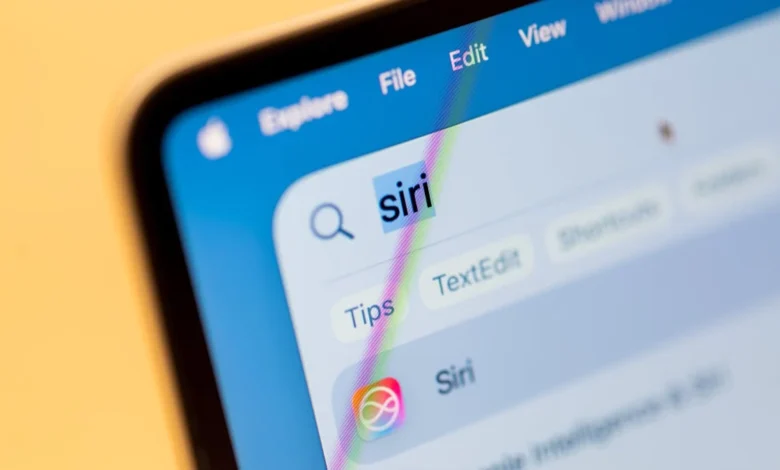
The long-anticipated relaunch of Siri as a sophisticated artificial intelligence assistant by Apple has begun to materialize for iOS users with the public beta release of Siri AI. However, a significant development has emerged from the macOS ecosystem, hinting at an even deeper, more pervasive integration of AI functionalities. A hidden, lightweight user interface for Siri AI has been discovered within the macOS 27 Golden Gate beta, providing a glimpse into Apple’s strategy to embed AI tools directly into the core operating system experience, moving beyond mere voice commands to proactive, context-aware assistance.
The Unveiling of a Stealthy AI Companion
The discovery, first reported by a Reddit user on the r/MacOSBeta subreddit, detailed a "hidden lightweight UI" for Siri AI. This innovative feature manifests as a discreet pop-up menu that appears whenever text is highlighted on the screen. Far from being a mere aesthetic alteration, this interface acts as a gateway to an array of powerful AI-driven tools designed to enhance productivity and streamline user interaction with their Mac. The suite of tools accessible through this pop-up includes functionalities such as "Rewrite," "Proofread," "How does this sound?," and "Edit with Siri," indicating a strong focus on text manipulation and refinement. Beyond these, the interface also offers quick options for summarization and the generation of bullet points from selected text, addressing common needs for information digestion and organization.
What makes this discovery particularly compelling is the contextual intelligence demonstrated by the hidden interface. Depending on the type of content highlighted, Siri AI adapts its suggestions. For instance, selecting a phone number immediately presents options to "Add to contacts," while highlighting an address offers an "Open in Maps" prompt. The utility extends further to creating calendar events, composing messages and emails, and even tracking flights and packages, showcasing a comprehensive attempt to integrate AI into various aspects of daily digital life. This level of context-awareness signifies a substantial leap from Siri’s previous iterations, which were often criticized for their limited understanding of user intent and lack of deep integration with system applications.
Apple’s Cautious Approach: Why the Secrecy?
The natural question arising from such a significant discovery is why Apple would keep such a feature hidden, especially in a beta meant for developer and public testing. As insights from publications like MacRumors suggest, the primary reason for its concealment is likely its unfinished state. Reports from users who have managed to activate the interface in macOS 27 developer beta 3 and public beta 1 indicate that certain features do not yet function as intended, with some options remaining entirely inoperable. This aligns with Apple’s stringent quality control standards; the company typically refrains from officially launching or even publicly acknowledging features that are not fully polished and robust. The beta phase is, by definition, a period for identifying and resolving such imperfections, and Apple prefers to present a cohesive, functional experience upon official release. This cautious approach, while frustrating for eager users, underscores Apple’s commitment to delivering high-quality, reliable software experiences, especially for a foundational technology like AI that carries high user expectations.
Enabling the Unseen: A Glimpse Behind the Curtain
Despite its hidden status, the Reddit community has already uncovered a method for activating this secret Siri AI interface for users running the macOS 27 Golden Gate beta. According to Redditor pdfu, the process involves executing specific commands in the Terminal application. While this offers an exciting opportunity for tech-savvy users to experiment with Apple’s future AI capabilities, it comes with a significant caveat. Manipulating system files and executing Terminal commands without a thorough understanding of their implications can potentially lead to system instability or data loss. Therefore, caution is strongly advised for anyone considering enabling this feature.
To activate the interface, users are instructed to open Terminal and input the following command:
sudo mkdir -p /Library/Preferences/FeatureFlags/Domain && sudo defaults write /Library/Preferences/FeatureFlags/Domain/WritingTools LightweightUI_macOS -dict Enabled -bool true
Following the execution of this command, a system restart is required for the changes to take effect and for the Siri AI interface to become enabled. For those who wish to revert the changes or if the experimental interface proves too unstable, it can be disabled by inputting another command in Terminal:
sudo defaults write /Library/Preferences/FeatureFlags/Domain/WritingTools LightweightUI_macOS -dict Enabled -bool false
This process also necessitates a system restart to fully disable the feature. This DIY activation method, while not officially sanctioned, highlights the enthusiasm within the Apple developer and power-user community for exploring the company’s evolving AI landscape.
Siri’s Evolution and Apple’s Grand AI Strategy
The discovery of this hidden macOS feature cannot be viewed in isolation; it is a critical piece of a much larger puzzle that represents Apple’s comprehensive and long-awaited overhaul of its artificial intelligence strategy. Siri, first introduced with the iPhone 4S in 2011, pioneered the concept of a mainstream voice assistant, captivating users with its ability to understand natural language and perform basic tasks. However, in the years that followed, Siri’s development appeared to stagnate, falling behind competitors like Google Assistant and Amazon Alexa in terms of capabilities, contextual understanding, and integration with third-party services. This perception led to widespread calls for Apple to revitalize its AI offerings.
The pressure on Apple intensified with the rapid advancements in generative AI, exemplified by large language models (LLMs) like OpenAI’s ChatGPT and Google’s Gemini. These developments dramatically raised user expectations for what an AI assistant should be capable of, from drafting complex texts to understanding intricate queries and personalizing interactions. In response, Apple embarked on a significant internal effort to reimagine its AI capabilities, culminating in the recent announcements at its annual Worldwide Developers Conference (WWDC), which are expected to coincide with the rollout of macOS 27 Golden Gate.
The company’s new overarching AI framework, branded as "Apple Intelligence," underscores a strategic pivot towards deeply integrated, privacy-centric, and personally relevant AI. Apple Intelligence is designed to leverage powerful generative models across its ecosystem, with a core emphasis on on-device processing to protect user privacy and enhance performance. The hidden Siri AI interface on macOS 27 aligns perfectly with this philosophy. It’s not just about a standalone AI application; it’s about infusing intelligence directly into the user’s workflow, making AI tools an intrinsic part of how one interacts with their Mac, rather than a separate, invoked entity. This integrated approach signifies a shift from a reactive voice assistant to a proactive, omnipresent intelligent layer across the operating system.
Broader Impact and Implications for the Apple Ecosystem
The potential implications of this integrated Siri AI interface are profound, touching upon productivity, user experience, privacy, and Apple’s competitive standing in the tech industry.
Enhanced Productivity and Workflow Streamlining: For professionals, students, and general users alike, the immediate availability of AI tools like rewrite, proofread, and summarization directly within any text field could dramatically enhance productivity. Imagine drafting an email, highlighting a paragraph, and instantly having Siri AI suggest improvements in tone or clarity, or quickly summarizing a lengthy document without switching applications. This seamless integration minimizes context switching, a known drain on efficiency, allowing users to remain focused on their primary task. The context-aware actions—adding contacts, opening maps, tracking packages—further extend this efficiency, turning routine tasks into single-click operations.
Privacy as a Differentiator: In an era of increasing data privacy concerns, Apple’s commitment to on-device processing for many of its Apple Intelligence features is a significant differentiator. By executing AI tasks locally on the device whenever possible, Apple minimizes the need to send sensitive user data to cloud servers, thus mitigating privacy risks. This approach is particularly relevant for features that handle personal communications, documents, and contacts. While some more complex generative AI tasks may still require cloud processing, Apple’s "Private Cloud Compute" system is designed to extend its privacy protections to these scenarios, offering a compelling alternative to competitors whose AI models often rely heavily on vast cloud data centers.
Unified Ecosystem Experience: The presence of a sophisticated Siri AI interface on macOS, alongside the iOS Siri AI beta, reinforces Apple’s ambition to create a unified and intelligent experience across all its devices. Users can expect a consistent set of AI capabilities and interactions, whether they are on their iPhone, iPad, or Mac. This ecosystem synergy has always been a cornerstone of Apple’s strategy, and the deep integration of AI elevates this interconnectedness to a new level, making the entire Apple experience more cohesive and powerful.
Competitive Landscape and Future Outlook: The unveiling of this hidden feature, alongside the broader Apple Intelligence initiative, positions Apple to reassert its leadership in the AI space. While competitors like Microsoft (with Copilot) and Google (with Gemini) have also made significant strides in integrating AI into their operating systems and productivity suites, Apple’s emphasis on privacy-centric, on-device intelligence and its unique ecosystem integration could provide a distinct competitive advantage. Analysts have long awaited Apple’s definitive AI move, and these developments signal a robust, long-term strategy rather than a reactive response.
The question of whether this specific Siri AI interface will launch with the official version of macOS 27 remains open. Given its current unfinished state, it is plausible that Apple will continue to refine it through subsequent beta releases, perhaps making it an opt-in feature or delaying its full public debut until a later macOS update. However, its mere existence in the beta is a powerful statement. It confirms Apple’s intent to deeply embed AI tools across its flagship desktop operating system, transforming Siri from a simple voice assistant into an intelligent, omnipresent companion that actively assists users in their daily digital lives. This shift marks a pivotal moment in Apple’s journey, promising a future where the Mac, empowered by advanced AI, becomes an even more intuitive and powerful tool for creation, communication, and productivity. The "Golden Gate" codename for macOS 27 thus seems particularly apt, symbolizing a bridge to a new era of intelligent computing.
Related posts: