The Apple Contacts application serves as the foundational architecture for communication across the Apple ecosystem, yet it remains one of the most underutilized tools in the modern digital toolkit. While most users view the app as a static repository for names and telephone numbers, its integration across iOS, iPadOS, and macOS offers a suite of advanced features designed to streamline data management, enhance privacy, and optimize daily productivity. As the digital landscape becomes increasingly cluttered with duplicate entries, legacy contacts, and outdated information, mastering these administrative functions is essential for maintaining an organized and secure personal or professional network.
The Evolution of Contact Management
Historically, digital address books were limited to simple text fields. However, with the introduction of iCloud synchronization in 2011, Apple transformed the Contacts app into a cloud-integrated hub. This shift allowed for real-time updates across multiple hardware platforms, creating a unified identity for users. By 2026, the complexity of contact data has grown to include social media handles, encrypted messaging signatures, and sophisticated metadata. According to internal usage trends, the average smartphone user now manages over 400 contacts, a significant increase from the 150-contact average recorded in the early 2010s. This growth in data volume necessitates the use of automated cleanup tools and intelligent grouping, which Apple has gradually integrated into its software suite to reduce the burden of manual maintenance.
Streamlining Data: The Science of De-duplication
One of the most frequent pain points for users is the accumulation of duplicate entries, often caused by migrating data from legacy email providers or syncing across different cloud services. The iOS and macOS Contacts infrastructure now features a sophisticated algorithm that scans for overlapping identifiers—such as matching phone numbers or unique email addresses.

On macOS, users can navigate to the "Card" menu to initiate a "Look for Duplicates" scan. This process performs a cross-reference of all fields, including physical addresses and custom labels. When duplicates are identified, the system suggests a "Merge" command, which consolidates disparate data points into a single, comprehensive record. This is a critical security practice, as fragmented contact cards can lead to data leakage or, more commonly, the failure to receive calls or messages from recognized contacts due to outdated information.
Advanced Gesture Controls and Bulk Operations
Efficiency in managing large volumes of data is a hallmark of the macOS experience, but mobile users often struggle with bulk actions. While desktop users benefit from standard keyboard shortcuts (Shift-Click or Command-Click), the mobile interface requires a more tactile approach.
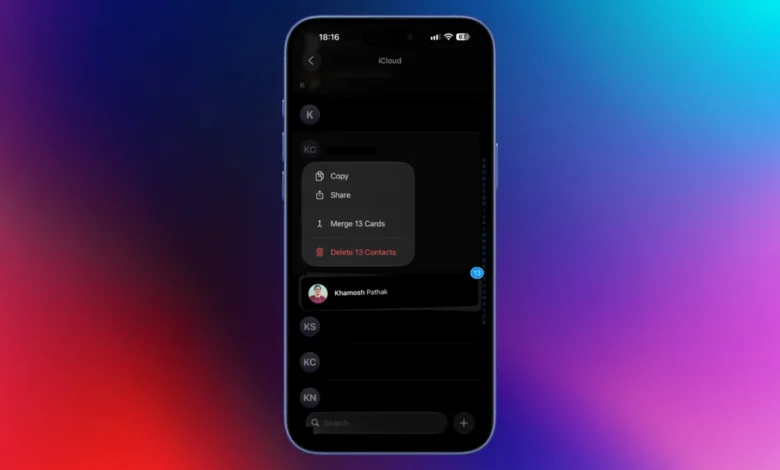
The two-finger swipe gesture serves as the primary mechanism for bulk selection on iOS. By placing two fingers on any contact entry and dragging vertically, users can highlight multiple cards simultaneously. This gesture facilitates rapid batch processing, such as mass deletion or bulk sharing, effectively bypassing the tedious process of editing individual cards. This functionality is particularly useful for enterprise users or those who manage large professional networks, as it allows for the quick pruning of outdated or redundant professional connections.
Enhancing Privacy through Strategic Data Sharing
The integration of NameDrop, introduced as a cornerstone of the iOS 17 update, redefined how individuals exchange contact details. By utilizing NFC (Near Field Communication) technology, users can exchange contact cards by bringing two devices into close proximity. While convenient, this feature highlights the necessity of maintaining a "curated" contact card.

Security experts emphasize that users should audit their personal contact cards for extraneous information—such as secondary home addresses, birthdates, or internal nicknames—before utilizing rapid sharing features. By navigating to the "My Card" section in the Contacts app, users can leverage the "Edit" function to sanitize their public-facing information. A professional headshot or a minimalist Memoji is increasingly favored over candid imagery, as it prevents the accidental distribution of personal media to acquaintances or professional contacts.
Integration with Third-Party Communication Platforms
The Contacts app has evolved beyond its traditional role of managing telephone and email data; it now serves as a gateway to modern communication protocols. By long-pressing the message or call icons within a contact card, users can trigger context-sensitive menus that reveal integration options for platforms like WhatsApp, Signal, and Telegram.
This functionality is a significant development in interoperability. Previously, users were required to open individual third-party applications to initiate conversations. Now, the Apple Contacts app acts as a centralized directory, automatically detecting which messaging services are installed and linked to a contact’s phone number. This not only saves time but also centralizes the digital communication workflow, allowing for a more cohesive experience across different messaging silos.
Customization and Automation: The Role of Smart Lists
For power users, the "Smart List" feature on macOS remains the most effective way to categorize and manage a vast network. Smart Lists function similarly to "Smart Playlists" in music or "Smart Folders" in the Finder, utilizing user-defined criteria to sort contacts dynamically.

A practical application of this is the "Recently Added" filter. By setting the criteria to "Card" -> "has changed in" -> "10 days," users can isolate contacts they have interacted with or created in the recent past. This is an invaluable tool for professional networking, where tracking new leads or follow-up contacts is essential. Furthermore, Smart Lists can be configured to group individuals by company, job title, or custom tags, effectively automating the segmentation of a professional database without the need for manual folder maintenance.
The Utility of vCard Portability
While iCloud provides seamless synchronization within the Apple ecosystem, the need for data portability remains vital. The "Export vCard" functionality on macOS allows users to convert their entire address book into a universal .vcf format. This file type is compatible with virtually every major contact management service, including Google Contacts and Microsoft Outlook.
For documentation purposes, the "Export as PDF" feature serves as an excellent alternative for creating a physical or digital backup that is human-readable. This practice is recommended by data privacy advocates as a contingency against account lockouts or cloud synchronization failures, ensuring that critical information remains accessible even if access to an Apple ID is temporarily compromised.
The Future of Contact Management
As we look toward the remainder of the 2020s, the role of the Contacts app is expected to shift further toward AI-driven organization. We can anticipate more robust features that automatically verify the accuracy of contact information—such as detecting if a phone number has been reassigned or if an email address is no longer valid.

The current hacks outlined here provide a framework for immediate optimization, but they also serve as a reminder of the importance of digital hygiene. By taking control of the metadata, utilizing bulk processing gestures, and implementing rigorous privacy settings on public-facing cards, users can ensure their primary communication tool remains an asset rather than a liability. The modern digital address book is no longer just a list of names; it is an active, evolving component of one’s professional and personal identity that requires consistent attention and systematic management.