
Mastering the Vivaldi Browser: A Comprehensive Guide to Power-User Efficiency and Customization

Vivaldi has established itself as a formidable contender in the crowded landscape of Chromium-based web browsers, offering a distinct alternative for users who prioritize granular control and built-in functionality over the minimalist aesthetic of Google Chrome. Launched in 2016 by Vivaldi Technologies—co-founded by former Opera Software CEO Jon von Tetzchner—the browser was designed to address the needs of "power users" who previously relied on a sprawling ecosystem of third-party extensions to achieve a functional workflow. Over the past decade, Vivaldi has evolved from a niche project into a robust, feature-rich ecosystem that integrates productivity tools directly into the browser core, effectively reducing the reliance on external applications.
The Evolution and Market Positioning of Vivaldi
The development of Vivaldi was born out of a perceived stagnation in the browser market. Following the transition of Opera from its proprietary Presto engine to Chromium in 2013, many veteran users expressed dissatisfaction with the loss of specialized features. Vivaldi was built specifically to bridge this gap, focusing on flexibility, privacy, and user-defined interface customization.
By September 2026, the browser has matured into a sophisticated product that challenges mainstream defaults. Its architecture is built upon the open-source Chromium project, ensuring compatibility with the vast majority of web standards and the expansive Chrome Web Store. However, Vivaldi differentiates itself through its proprietary user interface layer, which allows for deep modification of the browser’s behavior and visual layout.
Advanced Privacy and Extension Integration on Android
One of the most significant recent developments in Vivaldi’s ecosystem is the expanded support for extensions within its Android iteration. While Google’s own Chrome for Android remains largely closed to third-party extensions due to platform limitations, Vivaldi has leveraged its unique architecture to enable browser-level modifications. This allows users to deploy powerful privacy tools directly on mobile devices.

By utilizing the "puzzle piece" menu within the address bar, users can access the Chrome Web Store to install privacy-centric extensions. Key recommendations for a hardened browsing experience include uBlock Origin Lite for comprehensive ad and tracker blocking, Decentraleyes to mitigate tracking via centralized content delivery networks, and SponsorBlock to automatically bypass sponsored segments in streaming media. This functionality effectively turns a mobile browser into a desktop-grade productivity suite, providing a level of control over data telemetry that is currently unavailable in the native Chrome experience.
Optimizing Workflow with Workspaces and Tiled Tabs
For many professionals, the primary challenge of modern web browsing is "tab fatigue"—the cognitive and system-resource burden caused by maintaining dozens of open sites. Vivaldi addresses this through its native Workspaces feature, which allows for the logical grouping of browser tabs into distinct, project-based silos.
By navigating to the tab bar and selecting "New Workspace," users can partition their browsing environment. For example, a "Research" workspace might contain academic or technical documentation, while a "Social" workspace keeps communication platforms contained. This separation is more than cosmetic; it reduces the visual noise of the tab bar and allows for focused task management.
Complementing this is the "Tiled Follower Tabs" function. This feature allows for a split-screen view where a primary page remains active while a secondary link is opened in a tiled sub-window. By right-clicking a link and selecting "Open Link as Tiled Follower Tab," users can maintain their place in an original article while simultaneously reviewing cited sources or secondary content. This eliminates the need for constant "back-and-forth" navigation, a common point of friction in traditional browser design.
Command-Line Efficiency: Quick Commands and Automation
Vivaldi’s "Quick Commands" interface serves as a centralized control hub, drawing inspiration from high-end productivity tools like macOS Spotlight or Alfred. By pressing F2 or Ctrl-E (Command-E on Mac), users trigger a command prompt that can search through active tabs, browser settings, and even execute mathematical calculations.

Beyond simple navigation, the browser supports "Command Chains," a sophisticated automation tool that allows users to string together multiple actions into a single sequence. An example of this is the "Toggle Fullscreen and Reader View" chain, which prepares a webpage for distraction-free reading with a single command. These chains are managed via the browser’s settings menu, where users can create complex workflows without needing to write a single line of code. This level of automation is highly valued in enterprise environments where repetitive tasks, such as clearing cache or bulk-copying URLs, are routine.
Interface Customization and Menu Management
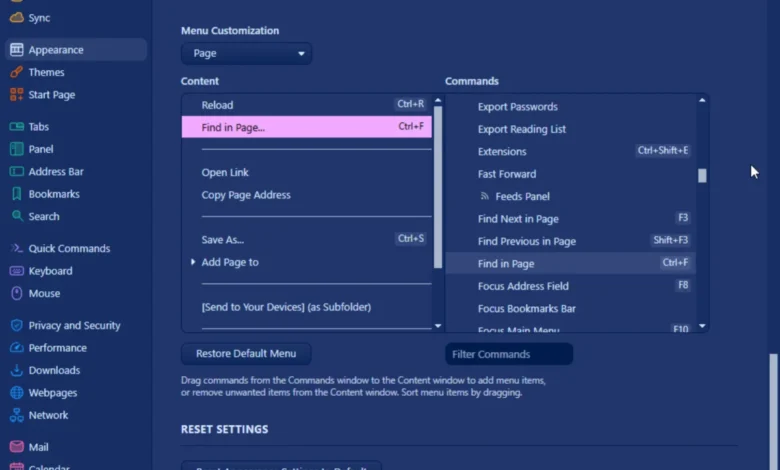
Vivaldi allows for a degree of "menu-level" customization rarely seen in competing browsers. Through the "Appearance" section of the settings menu, users can strip away redundant elements in the right-click context menu and replace them with frequently used actions, such as "Find in Page" or custom command chains.
This customization extends to the browser’s input methods. For users who prefer keyboard-centric workflows, "Caret Browsing" (activated via Shift-F7) allows for the selection and navigation of web text using only the arrow keys, mimicking the functionality of word processors. Conversely, those who prefer a mouse-driven experience can define custom gestures. By holding the right mouse button and executing specific mouse patterns, users can trigger actions like "Close Tab," "Reload," or "Back," significantly increasing navigation speed.
Resource Management and Battery Optimization
In the context of laptop performance, browser efficiency is critical. Vivaldi includes integrated performance tools under the "Energy Saver" and "Memory Saver" categories. These features are designed to manage the browser’s memory footprint—a common critique of Chromium-based browsers—by automatically unloading or suspending inactive tabs.
When "Memory Saver" is set to "Balanced," the browser dynamically reclaims RAM from background tasks, which in turn reduces the CPU load and preserves battery life. Additionally, the "Periodic Reload" feature—accessible by right-clicking a tab—provides a built-in method for monitoring live content without needing external refresh extensions. Users can set custom intervals ranging from one minute to 90 minutes, ensuring that news feeds or dashboards remain current while the browser remains stable.

The Broader Impact of Browser Customization
The implications of using a highly customizable browser like Vivaldi extend beyond mere convenience; they represent a shift in the philosophy of user agency. In an era where many browsers move toward simplified, "walled-garden" experiences, Vivaldi remains committed to the principle that the browser should adapt to the user, not the other way around.
Industry analysts note that while Vivaldi’s learning curve is steeper than that of Safari or Chrome, the long-term productivity gains for power users are substantial. By centralizing features that were once the domain of third-party developers, Vivaldi reduces the security risks associated with managing multiple browser extensions. Furthermore, the browser’s commitment to privacy—evidenced by its built-in ad and tracker blocking—positions it as a vital tool for users concerned with the data-harvesting practices inherent in the modern ad-supported web.
Conclusion
Vivaldi serves as a testament to the potential of the Chromium engine when paired with a design philosophy centered on modularity and user control. From its robust workspace management and advanced automation tools to its granular interface customization, the browser offers a comprehensive solution for users who require more than a basic window to the internet. As digital workflows continue to grow in complexity, the ability to tailor one’s browsing environment will likely remain a key differentiator for both professional and casual users alike. By leveraging these native hacks, users can transition from passive browsing to an efficient, high-performance web experience.